
Advanced Search and Filters
Find any WordPress REST API endpoint in seconds — even on sites with hundreds of registered routes. Endpoint Manager Pro gives you a real-time search bar and five purpose-built filters that work together to cut through the noise.
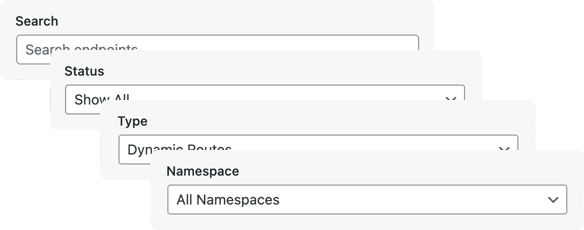
What It Does
The filtering toolbar sits above your endpoint list and provides five ways to narrow down what you see: a real-time text search, plus dropdown filters for status, route type, namespace, and HTTP method. All filters combine — apply multiple criteria at once to create precise views like “all enabled dynamic WooCommerce POST endpoints.”
As you filter, matching namespaces auto-expand, results are highlighted, and a counter shows how many endpoints match. A Clear Filters button resets everything in one click.
Filter by Status
Show all endpoints, only enabled ones, or only endpoints you have blocked. Use this during security audits to verify which REST API routes are currently exposed and which are locked down.
Filter by Route Type
Separate static routes (fixed paths like /wp/v2/posts) from dynamic routes (parameterized paths like /wp/v2/posts/(?P<id>[\d]+)). Dynamic routes accept user input and often need stricter access controls — isolating them makes auditing faster.
Filter by Namespace
Every REST API endpoint belongs to a namespace — wp/v2 for WordPress core, wc/v3 for WooCommerce, or custom namespaces registered by plugins and themes. The namespace dropdown lets you focus on a single plugin’s API surface at a time, so you can manage WooCommerce endpoints separately from core routes.
Filter by HTTP Method
Filter routes by HTTP method — GET, POST, PUT, or DELETE. Instantly separate read-only endpoints from write endpoints to find the routes that can modify data on your site.
Endpoint Search
Type any keyword to search across all routes and namespaces with real-time filtering. Matching terms are highlighted in the results. Trigger the search box from anywhere on the page with Ctrl/Cmd+F. Press Escape or click the X button to clear.
Combining Filters
All five filters work together. Combine them to create precise views:
- Namespace: wc/v3 + Type: Dynamic — find all parameterized WooCommerce routes
- Status: Enabled + Method: POST — see every write endpoint that is currently accessible
- Status: Disabled + search “users” — verify which user endpoints you have blocked
- Method: DELETE + Status: Enabled — audit all active deletion endpoints across your site
Why Filtering Matters for WordPress Security
A typical WordPress site with WooCommerce and a few plugins can register over 200 REST API endpoints. Without filtering, reviewing which endpoints are publicly accessible becomes tedious and error-prone. The filtering system makes it practical to:
- Audit exposed endpoints — filter by “Enabled” status to see exactly what is accessible via your REST API
- Review plugin endpoints — use the namespace filter to isolate endpoints registered by a specific plugin
- Find write endpoints — filter by POST, PUT, or DELETE to identify routes that can modify data
- Spot dynamic routes — identify endpoints that accept user input, which are more likely to need access controls
- Verify blocked routes — confirm that sensitive endpoints you have disabled are actually off
Once you have identified the endpoints you need to manage, use the endpoint preview to test them or check the security logs to see who is hitting blocked routes.
Frequently Asked Questions
How many filters can I apply at the same time?
All five — text search, status, route type, namespace, and HTTP method — work together simultaneously. There is no limit to combining them.
Does the search filter work with WooCommerce and third-party plugin endpoints?
Yes. Endpoint Manager detects all registered REST API namespaces. The namespace dropdown automatically lists every namespace on your site, including WooCommerce (wc/v3), Jetpack, and any custom namespaces from plugins or themes.
Can I filter endpoints on the free version?
The free version includes basic endpoint management with toggle controls and static preview. Advanced search and all five filters are available in Endpoint Manager Pro.