
Endpoint Preview
Endpoint Manager lets you test any WordPress REST API endpoint directly from the admin dashboard. No Postman, no browser console, no manually constructing URLs — click Preview and see the live API response.
What It Does
The preview feature builds a working request URL for any endpoint you select. For static routes like /wp/v2/posts, the URL is ready immediately — click and inspect. For dynamic routes that include variable segments, a guided modal presents each route parameter as a named input field, showing the full route structure inline so you know exactly what each segment expects. Fill in the values, confirm, and the resolved URL opens in a new tab so you can inspect the live JSON response.
Key Capabilities
- One-click preview for any registered WordPress REST API endpoint
- Fill-in-the-blanks modal for dynamic routes with named parameter fields
- Auto-detected default values pre-filled for each parameter
- Inline route structure display so you understand the URL format before submitting
- Works across all registered namespaces — WordPress core, WooCommerce, and third-party plugins
- Opens the resolved API response in a new browser tab
How to Use It
Open the Endpoints screen in your WordPress admin, locate any route, and click its Preview button. For static endpoints the response opens immediately. For dynamic endpoints a modal appears where you enter each route parameter — the plugin pre-fills sensible defaults so you can submit right away or adjust as needed. The resolved URL opens in a new tab.
Use the advanced search and filters to narrow down the endpoint list before previewing, or filter by route type to focus on dynamic endpoints that need parameter input.
Why It Matters
Manually constructing REST API URLs is slow and error-prone — especially for parameterized routes with regex patterns. The guided preview modal removes the guesswork and keeps your entire workflow inside the WordPress admin. You spend less time switching between tools and more time acting on what the API actually returns.
For developers building custom integrations, agencies auditing client sites, or store owners verifying WooCommerce API responses, endpoint preview turns a multi-step process into a single click.
Frequently Asked Questions
Does endpoint preview work with WooCommerce endpoints?
Yes. Endpoint Manager detects all registered REST API namespaces, including wc/v3 and any other plugin or theme namespace. You can preview any endpoint regardless of which plugin registered it.
Can I preview endpoints that require authentication?
The preview opens the endpoint URL in your browser. If you are logged in to WordPress as an administrator, authenticated endpoints will return full data. Unauthenticated endpoints will return publicly available data only.
What happens if I preview a blocked endpoint?
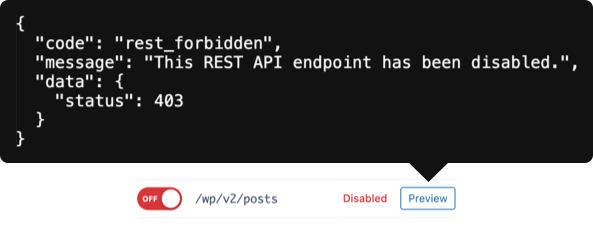
Blocked endpoints return a 403 Forbidden response. The preview still opens so you can verify the block is working as expected. The request is also logged in the security logs.