
API Security & Insights
Get a live security overview of your WordPress REST API on the admin dashboard. See how many endpoints are active, how many are blocked, and where your API surface is exposed — all without leaving the Endpoints screen.
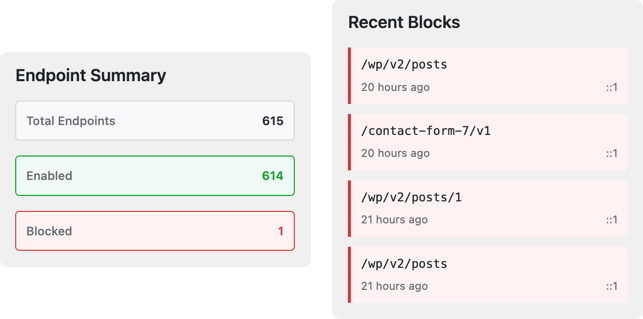
What It Does
The Insights panel aggregates key REST API health signals into a single summary view. It displays the total number of registered endpoints, how many are currently enabled versus blocked, and links directly to the Security Logs page for deeper investigation. Instead of piecing together information from multiple screens, you get a clear read on your API security posture every time you open the dashboard.
Combined with the advanced search and filters, you can go from a high-level overview to a granular endpoint-by-endpoint audit in seconds.
Key Capabilities
- At-a-glance REST API health summary on the Endpoints screen
- Total count of registered endpoints across all namespaces
- Breakdown of currently enabled and blocked endpoints
- Direct link to blocked-request logs for immediate investigation
- Highlights endpoints that have been disabled for security
- No external service required — all data stays on your server
- Updates in real time as you enable or disable endpoints
How to Use It
The insights summary appears automatically on the main Endpoints screen — no configuration needed. Use it as a daily health check: verify your blocked endpoint count is where you expect it, and follow the links to Security Logs when you want to drill into specific blocked requests.
If a number looks unexpected — for example, more endpoints enabled than you intended — use the filters to find the new endpoints and decide whether to block or allow them.
Why It Matters
WordPress REST API endpoints are a frequent target for automated scanners, credential-testing bots, and enumeration attacks. Every plugin you install can register new endpoints that are enabled by default — often without any notification.
A persistent security overview means new endpoints and configuration changes surface immediately rather than going unnoticed. You get the information you need to respond quickly, verify your security posture after plugin updates, and maintain confidence that your API surface matches your intentions.
Frequently Asked Questions
Does the insights panel detect new endpoints added by plugin updates?
Yes. The panel reads the live list of registered REST API endpoints every time the Endpoints screen loads. When a plugin update adds new routes, they appear in the count immediately.
Does this feature send data to an external server?
No. All data is generated and stored locally on your WordPress installation. Nothing is sent externally.
Can I see which specific endpoints were recently added?
The insights panel shows aggregate counts. To identify specific endpoints, use the namespace filter to isolate the plugin whose endpoints you want to review, or check the security logs to see which routes are receiving traffic.